Internals of AI Apps: Durability
Ashutosh Singh ·
My first time interacting with a LLM API was weird.
Wait? it is a stream of chunks? How do I even use this? Let me try again…,oops hmm again, here goes my 1$
We’ve come a long way from that. The apps and cli tools we use are a lot nicer, and most of them are still a chat box. And behind that box, a message can run for long time: dozens of LLM calls, external APIs, tool running and tokens streaming the whole time. If that fails halfway, “let me try again” means paying for all of it again. It’s the same $1 mistake, just much bigger.
AI Apps seemingly new set of problems for the people who build them. The first to discuss is durability.
What is durability?
Conventionally, durability means that once a transaction is committed, it stays committed. When the app says done, it is actually done, even if the server crashes a second later.
For an AI app the work takes minutes or hours, so the promise is about work in progress. It survives failure and picks up where it left off, instead of restarting or silently dying.
Why not just restart?
- Time: the user has already waited minutes. Starting over makes them wait again.
- Money: every LLM call is billed and the compute underneath is costly. A run that dies at step 40 of 50 pays for those 40 steps twice.
- Different result: LLMs are a probablistic machine, also some of the work can’t be redone safely - external tool calls.
What is running behind the chat box?
To see what has to survive, we need to understand what runs behind when you send that message.

The harness is the code around the model. It takes the user’s message, calls the LLM, and runs whatever tools the LLM asks for, until the LLM replies without asking for one.
Steps 2 to 6 go in a loop once per tool call, so a single message can mean dozens of LLM calls. The dashed blue arrows are streamed: they reach the screen as they’re produced, not at the end.
What can go wrong in that loop?
A normal request is over in milliseconds, so if it fails you retry it. This loop is different:
- Long lived (the whole loop)
- Agents run for minutes or hours, can outlive deployments, pod restarts
- Expensive steps (2 to 4)
- Each LLM call costs money and latency. Restarting from zero after step 40 of 50 is wasteful
- Non deterministic (3)
- Rerunning (even a single step) can give a different outcome
- Side effects (5)
- Tool calls are not safe to repeat. They do things outside of your system: charge a card twice, write to a db twice, send the same email again
- Response streaming (3 and 8)
- The user puts the app in background, loses network, opens another device. They should be able to leave and rejoin whenever
- Waiting on humans (between 4 and 5)
- Humans are required to be in the loop. We cannot hold a connection or process open for 3 days for “Approve this action?”
Every one of the step in the loop is a way for the run to die or to repeat itself. So the goal is a ”durable” loop where any step can fail and the run still carries on from where it stopped.
And a plain retry fixes none of them.
How do we build a durable loop?
We’ll start with the simplest version and keep going until it stops breaking. Each level exists because the one before it failed somewhere.
Level 0: Run tied to the connection
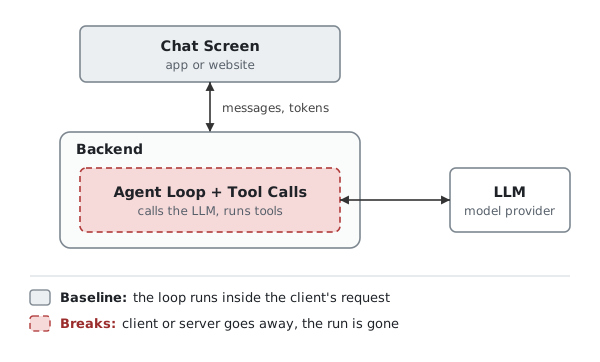
This is the most basic version. The client sends a message, the backend runs the agent loop and streams tokens back on the same connection.
The loop, its state and the client connection are all one request in one process, which is why it is so simple to write.
If the client goes away (closed tab, locked phone, wifi switching to mobile data). The loop either stops or keeps going with nobody to tell, and the user is left with half an answer. If the server goes away (deploy, crash, scale down), the loop and everything it knew was in memory, so that is gone too. The tokens were paid for in both cases.
It is fine for a prototype, or for short chats where retry is cheap. Once runs take more than a few seconds or users are on phones, it gets painful quickly.
Level 1: Decouple the run from the client
The loop should not care whether anyone is listening. A nonchalant loop, deep in performing its art. It does the work and records what happened, and the client reads that record whenever it wants.
There are two ways to do this:
1a. Events in memory
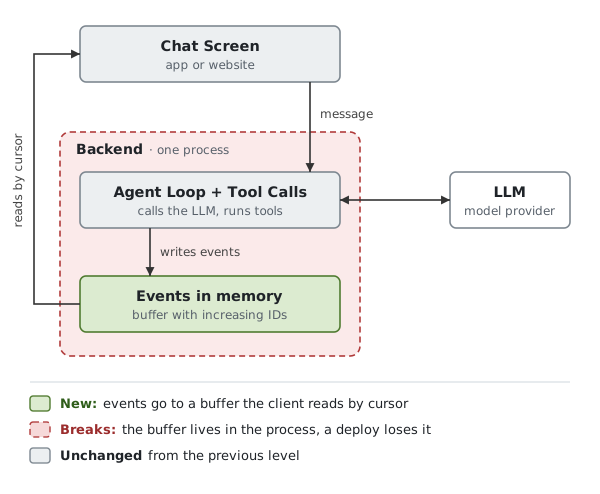
Instead of writing to the socket, the loop appends each event to a buffer (token chunks, tool call started, tool result), each with an increasing ID. A reader serves the client from that buffer, starting at a cursor.
SSE mostly gives you this for free. Send an id: with every event, and when the connection drops the browser reconnects with a Last-Event-ID header. The server replays everything after that ID and goes live again. The run never noticed the drop, and a second device can read the same buffer.
The buffer lives inside the backend process though, so it dies with it. A deploy takes the buffer and the run to restart together. Reconnects also have to reach the same instance that holds the buffer, which gets annoying at scale.
1b. Events out of the process
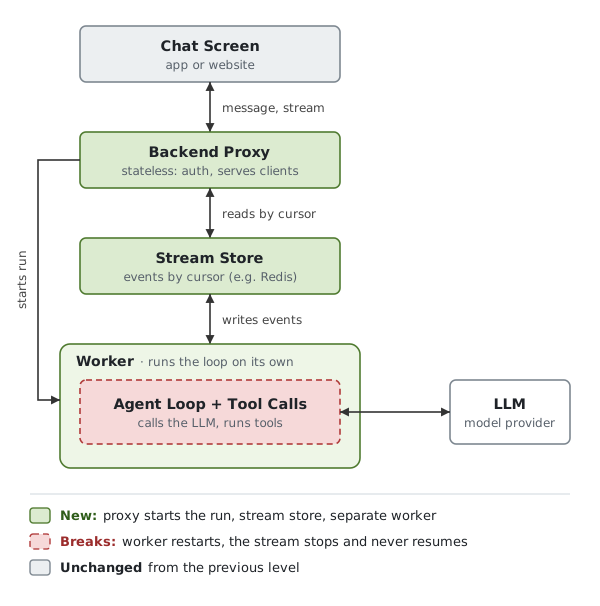
The backend is now three parts:
- Backend proxy: stateless, does auth and serves clients, any instance can handle any reconnect
- Stream store: what the user sees lives here, redis streams work for this.
- Computer: where the agent loop and tool calls run, with its own lifecycle. Deploying the API doesn’t touch it.
What exactly is a computer here? it is a long running worker: a process on a server or a container that runs the harness. Or a custom written CLI.
It is the only part which interacts with the LLM provider. What the user wants comes from the proxy request. Then tt creates the request for the LLM: system prompt + user query + context + tool definitions + the conversation context so far.
All of its connections are outbound, so nothing needs to reach it from the internet.
As the LLM reply comes back, it turns the chunks into your own event format (token text, tool call started, tool results) gives each an ID, and then writes them to the stream store.
And the proxy reads from it starting at the client’s cursor and keeps tailing. The proxy and the loop never talk to each other.
The stream is safe now but the run still isn’t. If the computer restarts halfway, the user sees the stream stop where it stopped and never continues on its own. The store knows what was shown, not what was done.
LLM calls, tools ran and all the conversation context was in the memory of the memory of a process inside computer that no longer exists.
References of computers: openai-agents-python, pi, openhands
Level 2: Step-level checkpointing
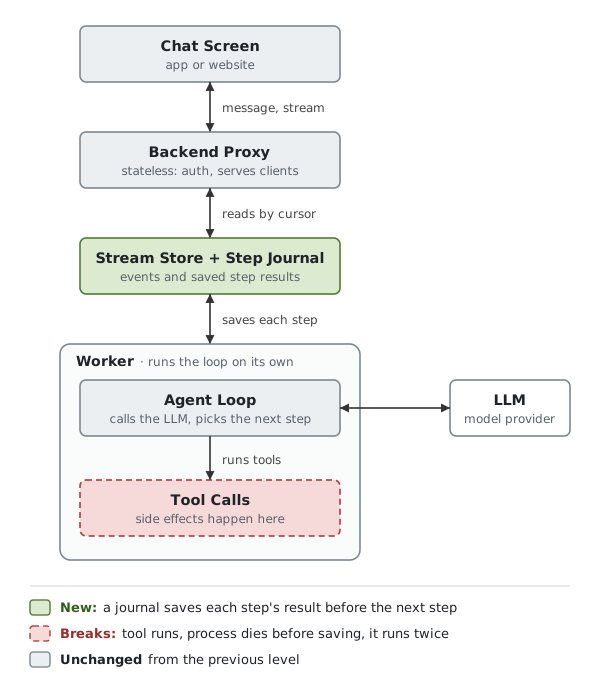
Level 1 makes sure the user can always see what happened. This level is about the work itself.
If the computer dies, everything the loop knew is gone. The fix is simple. After every step, an LLM call or a tool call (any significant step for your loop) save the result before moving on. One row per step: the run, the step number, what came back. A journal for the agent.
When a dead run is picked up again, it doesn’t start from zero. It reads the journal and, for every step that is already in it, uses the saved result instead of calling anything again. It carries on from the first step that is missing. A run that died on step 67 resumes at 67.
It has to reuse the saved results because of non determinism. Call the LLM a second time and you get a different answer, and the steps after it were built on the first one. So on resume the journal rebuilds the conversation exactly as it was, and the next LLM call carries on from there.
Tool calls are in the danger red box now:
- the tool call runs, the card is charged
- the process dies before the result is written to the journal
- on resume there is no record of that step, so it runs again
There is no true exactly once for things outside our system, but we can get close: An idempotency key per call, built from the run and step number, so the other side can spot a repeat and ignore it. Perfer tools that are safe to repeat: “write this file” rather than “append to this file”. And writing before what you’re about to do to the journal before the call. and the result after. If something goes wrong, we have compare before and after.
Another breaking point - who notices if a run died and restarts it? Nobody, unless we build that. A simple way is for the worker to report in every few seconds (heartbeats), if silence for too long, another worker takes over. Add retries and timeouts for steps that hang.
And it keeps going. You deploy a change to the steps while old runs are halfway through their journals, and now you have to decide which code resumes them. A run waiting on a human for three days has to stop, hold nothing in memory, and be woken up later.
By that point you’ve written most of a workflow engine.
Level 3: Durable execution engines
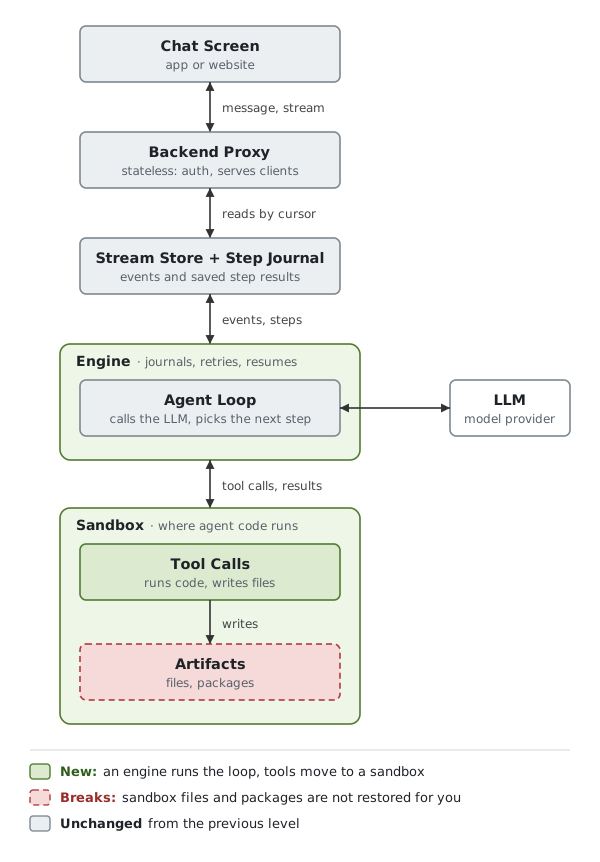
Two things change in the diagram. The agent loop now runs inside an engine, and tool calls move out into a sandbox, since they run code the model wrote.
Level 2 left us with a lot to maintain: the journal, the replay, noticing dead runs. An engine is all of that, built once.
We write the loop as a normal function and mark each LLM call and tool call as a step. The engine saves every step’s result. If the worker dies, another one runs the function again from the top. Steps that already have a result return it straight away, and the first one without a result runs for real.
It also handles the rest of what Level 2 left us with:
- Dead runs: notices a worker went quiet and gives its run to another one. Retries steps and times out the ones that hang.
- Deploys: gives us a way to change the steps while old runs are halfway through.
- Long waits: lets a run sleep for days on a timer or a person’s answer, holding nothing in memory.
None of that is about our product, so arguably it’s the part worth not writing ourselves.
Temporal, DBOS, Inngest and Restate are some engines like this. They differ underneath: Temporal keeps an event history in its own service, and DBOS is a library that saves steps into our Postgres.
The red box is what the engine doesn’t save: the files and packages in the sandbox. It knows which step we were on, but not what the steps left behind: files written, packages installed, a dev server running. If the sandbox dies, replaying the steps won’t bring them back. So a run that does real work needs one of two things: the environment survives, or it can be rebuilt.
Surviving is something sandbox providers can do for us. E2B and Daytona can pause a sandbox with its files and memory and resume it later, and most providers can snapshot one and start new sandboxes from that snapshot. We get back the state as of the last pause or snapshot, so the steps after it still get replayed. What differs is whether running processes come back or only files, and whether we can host it ourselves. Rebuilding means saving files outside the sandbox as they’re made and letting steps set up what they need.
Finally, an engine doesn’t give us exactly once. Most of them run a step at least once, so a step can still repeat after a crash, and the idempotency keys from Level 2 are still ours. They also replay our code, so what sits between steps has to behave the same every time. Anything random or time based goes inside a step.
Which level do you need?
It depends on what you are building. Start at the lowest level that works and move up when it hurts. Each one costs more to build and run than the last.
- Chat reply: short, the user is watching, and retrying is cheap. Level 1 is enough. 1a until people are on phones, switching devices or you deploy often, then 1b.
- Scheduled task: nobody is attached when it runs, so nobody is there to retry. Missed runs and double runs are yours to handle. Level 2 at least.
- App or website builder: runs for minutes, lots of steps, side effects, files everywhere. Level 3, or a careful Level 2 with a plan for the sandbox.
- Anything waiting on an approval: a person can take days, and you can’t hold a process open that long. Level 3. Timers and waiting are what engines are for.
The harnesses Claude, Codex that we daily use are easily level 3 +
They don’t rent this stack, they run it. Claude Code’s cloud sessions, for example, run in isolated VMs on Anthropic-managed infrastructure. At that scale the loop, the stream store and the sandbox are all part of the product.
What durability doesn’t cover
A durable run is one that survives, that is the only promise. We still have unsolved problems, and some get worse by solving for durability.
- Stopping it. Once the run doesn’t depend on the client, closing the tab no longer ends it. We need an a way to force stop, plus limits on turns and spend, and a failure mechanism (a stuck scren costs everyones).
- Being right. A run that resumes faithfully resumes its mistakes just as confidently. Durability keeps all the plans alive, be it a good or a bad one.
- What we store. The stream and the journal hold everything the run saw, secrets included. How long do we keep it, who can read it, and how does a user delete it?
Another good problem to look at apart from durabilitiy is Isolation. Making sure agent’s environment is safe, how isolated it is and what a new sandbox costs to start can be the next post.